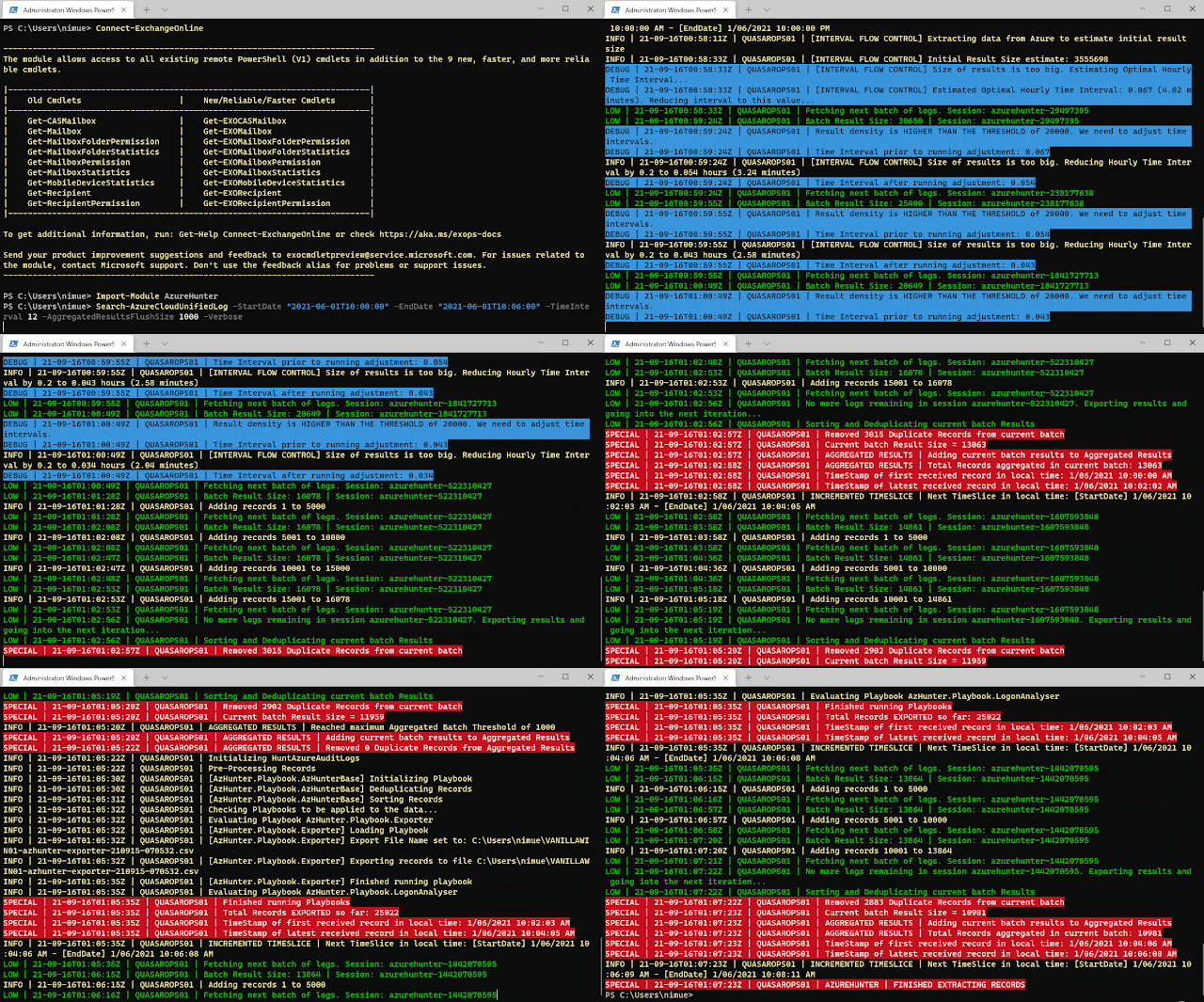
A Powershell module to run threat hunting playbooks on data from Azure and O365 for Cloud Forensics purposes.
1. Check that you have the right O365 Permissions
The following roles are required in Exchange Online, in order to be able to have read only access to the UnifiedAuditLog: View-Only Audit Logs or Audit Logs.
These roles are assigned by default to the Compliance Management role group in Exchange Admin Center.
NOTE: if you are a security analyst, incident responder or threat hunter and your organization is NOT giving you read-only access to these audit logs, you need to seriously question what their detection and response strategy is!
More information:
- How to search the Audit Log using the GUI
- Manage role groups in Exchange Online
- How to enable the UnifiedAuditLog
NOTE: your admin can verify these requirements by running
Get-ManagementRoleEntry "*\Search-UnifiedAuditLog"in your Azure tenancy cloud shell or local powershell instance connected to Azure.
2. Ensure ExchangeOnlineManagement v2 PowerShell Module is installed
Please make sure you have ExchangeOnlineManagement (EXOv2) installed. You can find instructions on the web or go directly to my little KB on how to do it at the soc analyst scrolls
3. Either Clone the Repo or Install AzureHunter from the PSGallery
3.1 Cloning the Repo
- Clone this repository
- Import the module
Import-Module .\source\AzureHunter.psd1
3.2 Install AzureHunter from the PSGallery
All you need to do is:
Install-Module AzureHunter -Scope CurrentUser
Import-Module AzureHunter
What is the UnifiedAuditLog?
The unified audit log contains user, group, application, domain, and directory activities performed in the Microsoft 365 admin center or in the Azure management portal. For a complete list of Azure AD events, see the list of RecordTypes.
The UnifiedAuditLog is a great source of cloud forensic information since it contains a wealth of data on multiple types of cloud operations like ExchangeItems, SharePoint, Azure AD, OneDrive, Data Governance, Data Loss Prevention, Windows Defender Alerts and Quarantine events, Threat intelligence events in Microsoft Defender for Office 365 and the list goes on and on!
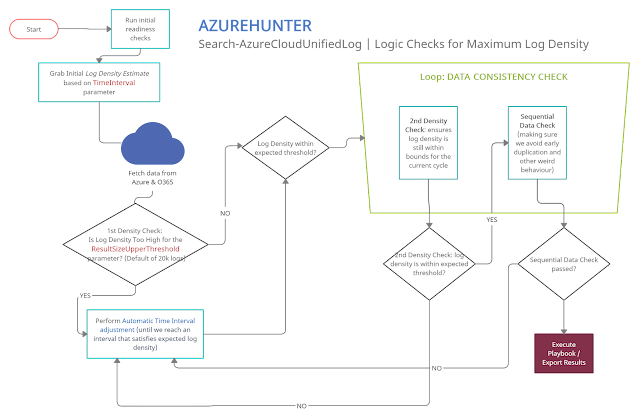
AzureHunter Data Consistency Checks
AzureHunter implements some useful logic to ensure that the highest log density is mined and exported from Azure & O365 Audit Logs. In order to do this, we run two different operations for each cycle (batch):
- Automatic Window Time Reduction: this check ensures that the time interval is reduced to the optimal interval based on the ResultSizeUpperThreshold parameter which by default is 20k. This means, if the amounts of logs returned within your designated TimeInterval is higher than ResultSizeUpperThreshold, then an automatic adjustment will take place.
- Sequential Data Check: are returned Record Indexes sequentially valid?
Ensure you connect to ExchangeOnline
It's recommended that you run Connect-ExchangeOnline before running any AzureHunter commands. The program checks for an active remote session and attempts to connect but some versions of Powershell don't allow this and you need to do it yourself regardless.
Run AzureHunter
AzureHunter has two main commands: Search-AzureCloudUnifiedLog and Invoke-HuntAzureAuditLogs.
The purpose of Search-AzureCloudUnifiedLog is to implement a complex logic to ensure that the highest percentage of UnifiedAuditLog records are mined from Azure. By default, it will export extracted and deduplicated records to a CSV file.
The purpose of Invoke-HuntAzureAuditLogs is to provide a flexible interface into hunting playbooks stored in the playbooks folder. These playbooks are designed so that anyone can contribute with their own analytics and ideas. So far, only two very simple playbooks have been developed: AzHunter.Playbook.Exporter and AzHunter.Playbook.LogonAnalyser. The Exporter takes care of exporting records after applying de-duplication and sorting operations to the data. The LogonAnalyser is in beta mode and extracts events where the Operations property is UserLoggedIn. It is an example of what can be done with the playbooks and how easy it is to construct one.
When running Search-AzureCloudUnifiedLog, you can pass in a list of playbooks to run per log batch. Search-AzureCloudUnifiedLog will pass on the batch to the playbooks via Invoke-HuntAzureAuditLogs.
Finally Invoke-HuntAzureAuditLogs can, be used standalone. If you have an export of UnifiedAuditLog records, you can load them into a Powershell Array and pass them on to this command and specify the relevant playbooks.
Example 1 | Run search on Azure UnifiedAuditLog and extract records to CSV file (default behaviour)
Search-AzureCloudUnifiedLog -StartDate "2020-03-06T10:00:00" -EndDate "2020-06-09T12:40:00" -TimeInterval 12 -AggregatedResultsFlushSize 5000 -VerboseThis command will:
- Search data between the dates in StartDate and EndDate
- Implement a window of 12 hours between these dates, which will be used to sweep the entire length of the time interval (StartDate --> EndDate). This window will be automatically reduced and adjusted to provide the maximum amount of records within the window, thus ensuring higher quality of output. The time window slides sequentially until reaching the EndDate.
- The
AggregatedResultsFlushSizeparameter speficies the batches of records that will be processed by downstream playbooks. We are telling AzureHunter here to process the batch of records once the total amount reaches 5000. This way, you can get results on the fly, without having to wait for hours until a huge span of records is exported to CSV files.
Example 2 | Run Hunting Playbooks on CSV File
We assume that you have exported UnifiedAuditLog records to a CSV file, if so you can then do:
$RecordArray = Import-Csv .\my-exported-records.csv
Invoke-HuntAzureAuditLogs -Records $RecordArray -Playbooks 'AzHunter.Playbook.LogonAnalyser'
You can run more than one playbook by separating them via commas, they will run sequentially:
$RecordArray = Import-Csv .\my-exported-records.csv
Invoke-HuntAzureAuditLogs -Records $RecordArray -Playbooks 'AzHunter.Playbook.Exporter', 'AzHunter.Playbook.LogonAnalyser'
Why?
Since the aftermath of the SolarWinds Supply Chain Compromise many tools have emerged out of deep forges of cyberforensicators, carefully developed by cyber blacksmith ninjas. These tools usually help you perform cloud forensics in Azure. My intention with AzureHunter is not to bring more noise to this crowded space, however, I found myself in the need to address some gaps that I have observed in some of the tools in the space (I might be wrong though, since there is a proliferation of tools out there and I don't know them all...):
- Azure cloud forensic tools don't usually address the complications of the Powershell API for the
UnifiedAuditLog. This API is very unstable and inconsistent when exporting large quantities of data. I wanted to develop an interface that is fault tolerant (enough) to address some of these issues focusing solely on the UnifiedAuditLog since this is the Azure artefact that contains the most relevant and detailed activity logs for users, applications and services. - Azure cloud forensic tools don't usually put focus on developing extensible
Playbooks. I wanted to come up with a simple framework that would help the community create and share new playbooks to extract different types of meaning off the same data.
If, however, you are looking for a more feature rich and mature application for Azure Cloud Forensics I would suggest you check out the excellent work performed by the cyber security experts that created the following applications:
I'm sure there is a more extensive list of tools, but these are the ones I could come up with. Feel free to suggest some more.
Why Powershell?
- I didn't want to re-invent the wheel
- Yes the Powershell interface to Azure's UnifiedAuditLog is unstable, but in terms of time-to-production it would have taken me an insane amount of hours to achieve the same thing writing a whole new interface in languages such as .NET, Golang or Python to achieve the same objectives. In the meanwhile, the world of Cyber Defense and Response does not wait!
TODO
- Specify standard playbook metadata attributes that need to be present so that AzureHunter can leverage them.
- Allow for playbooks to specify dependencies on other playbooks so that one needs to be run before the other. Playbook chaining could produce interesting results and avoid code duplication.
- Develop Pester tests and Coveralls results.
- Develop documentation in ReadTheDocs.
- Allow for the specification of playbooks in SIGMA rule standard (this might require some PR to the SIGMA repo)
More Information
For more information
Credits
- Icon made by itim2101 from www.flaticon.com
- Free Pentest Tools For Windows
- Android Hack Tools Github
- Pentest Tools Alternative
- Hacking Tools
- Pentest Tools For Mac
- Pentest Tools Windows
- Pentest Tools Subdomain
- Pentest Automation Tools
- Black Hat Hacker Tools
- Pentest Tools Subdomain
- Best Pentesting Tools 2018
- New Hack Tools
- Hacking Tools
- Hacking Tools Kit
- Hacker Tools List
- Tools For Hacker
- Hack Tools
- Pentest Tools Windows
- Hack Tools For Pc
- Termux Hacking Tools 2019
- Hack Tool Apk No Root
- What Are Hacking Tools
- Hack Tools Online
- Best Pentesting Tools 2018
- Hacker Tools Free Download
- Hack Apps
- Hack Tools
- Hacking Tools Free Download
- World No 1 Hacker Software
- Hacker Search Tools
- Hack Tool Apk
- Hak5 Tools
- Pentest Tools Android
- Tools 4 Hack
- Ethical Hacker Tools
- Hacker Tools Free Download
- Hacking Tools For Windows
- Kik Hack Tools
- Pentest Tools Review
- Hacker Tools For Pc
- Hackers Toolbox
- Hacker Security Tools
- Beginner Hacker Tools
- Hacker Tools Free Download
- Best Pentesting Tools 2018
- Hacker Tools Software
- Nsa Hacker Tools
- Underground Hacker Sites
- How To Install Pentest Tools In Ubuntu
- Hacking Tools Free Download
- Hacker Hardware Tools
- Hacking Apps
- Hacker Tools Apk Download
- Blackhat Hacker Tools
- Hacker Tool Kit
- Hack App
- Hack Tools For Mac
- Hack Tools For Pc
- Pentest Tools Windows
- Nsa Hack Tools Download
- Hacker Tools For Pc
- Pentest Tools Bluekeep
- Computer Hacker
- Hacking Tools And Software
- Pentest Tools Nmap
- Hacking Tools Windows 10
- Hacking Tools For Games
- Computer Hacker
- Hacker Tools Online
- Pentest Tools Port Scanner
- Hacker Tools 2020
- Hack Tool Apk No Root
- Hacking Tools Download
- Pentest Tools Open Source
- Tools For Hacker
- Hacker Tools Github
- Hacking Tools
- Hacking Tools Windows
- Hacker Tools For Ios
- Hack Tool Apk
- Hacker Tools Apk Download
- Hacker Tools Github
- Pentest Tools Github
- Tools Used For Hacking
- Hacker Tools Mac
- New Hack Tools
- Physical Pentest Tools
- Pentest Recon Tools
- Pentest Box Tools Download
- Hacking Tools 2019
- Hackers Toolbox
- Best Hacking Tools 2019
- Ethical Hacker Tools
- Wifi Hacker Tools For Windows
- Hacking Tools
- Hack Tools For Games
- Hacking Tools And Software
- Hack Tool Apk No Root
- Hacking Tools For Windows 7
- Hacks And Tools
- Hack App
- Pentest Tools Github
- Hacking Tools For Windows
- Hack Rom Tools
- Hacker Tools For Pc
- Blackhat Hacker Tools
- Hacking Tools Hardware
- Hacker Tools Free
- Physical Pentest Tools
- Kik Hack Tools
- Hacking App
- Pentest Tools Framework
- Blackhat Hacker Tools
- Hacker Search Tools
- New Hack Tools
- Pentest Tools Review
- Wifi Hacker Tools For Windows
- Hacking Tools Software
- Hacker Tools Hardware
- Pentest Tools Alternative
- Pentest Tools Linux
- Hacking Tools Usb
- Underground Hacker Sites
- Hacking Tools Free Download
- Hacker Hardware Tools
- How To Install Pentest Tools In Ubuntu
- Easy Hack Tools
- Hack Rom Tools
- New Hacker Tools
- New Hacker Tools
- Usb Pentest Tools
- Pentest Recon Tools
- Hack App
- Hacker Tools Mac
- Hacking Tools Windows 10
- Hack Tools For Ubuntu
- Hacker Tools Software
- Pentest Tools Subdomain
- Pentest Tools Online
- Pentest Tools Subdomain
- Android Hack Tools Github
- Pentest Tools Online
- Physical Pentest Tools
- Pentest Tools Port Scanner
- Hacker Tools Linux
- Hacker Tools Free Download
- Easy Hack Tools
- Pentest Reporting Tools
- Hacker Tools Software
- Bluetooth Hacking Tools Kali
- Pentest Tools Apk
- Hacking Tools Kit
- Usb Pentest Tools
- Hacking Tools Mac
- Hak5 Tools
- Hacker Tools For Ios
- Hacker Tools Windows
- Hacking Tools For Windows Free Download
- Best Pentesting Tools 2018
- Hacker Tools Hardware
- Hacking Tools For Kali Linux
- Hacker Tools For Mac
- Hacker Tools Apk Download
- Growth Hacker Tools
- Hackrf Tools
- Pentest Tools For Mac
- Hacker Tool Kit
- Hacking App
- Hacker Security Tools
- Pentest Tools Find Subdomains
- Hacking Apps
- Game Hacking
- Pentest Tools Kali Linux
- Hacker Tools Free
- Pentest Tools For Android

No comments:
Post a Comment