 Read more
Friday, May 22, 2020

Thursday, May 21, 2020
RED_HAWK: An Information Gathering, Vulnerability Scanning And Crawling Tool For Hackers


About RED_HAWK: RED_HAWK is a all in one tool for Information Gathering, Vulnerability Scanning and Crawling. A must have tool for all pentesters and hackers.
RED_HAWK's features:
- Basic ScanSite Title (NEW):
IP Address
Web Server Detection IMPROVED
CMS Detection
Cloudflare Detection
robots.txt Scanner - Whois Lookup (IMPROVED)
- Geo-IP Lookup
- Grab Banners IMPROVED
- DNS Lookup
- Subnet Calculator
- Nmap Port Scan
- Sub-Domain Scanner IMPROVED:
Sub Domain
IP Address - Reverse IP Lookup and CMS Detection IMPROVED:
Hostname
IP Address
CMS - Error Based SQLi Scanner
- Bloggers View NEW
HTTP Response Code
Site Title
Alexa Ranking
Domain Authority
Page Authority
Social Links Extractor
Link Grabber - WordPress Scan NEW
Sensitive Files Crawling
Version Detection
Version Vulnerability Scanner - Crawler
- MX Lookup NEW
- Scan For Everything - The Old Lame Scanner
List of CMS Supported on RED_HAWK
RED_HAWK's CMS Detector currently is able to detect the following CMSs (Content Management Systems) in case the website is using some other CMS, Detector will return could not detect.
- WordPress
- Joomla
- Drupal
- Magento
RED_HAWK Installation
How To Configure RED HAWK with moz.com for Bloggers View Scan?
How to use RED_HAWK?
Known Issues of RED_HAWK
ISSUE: Scanner Stops Working After Cloudflare Detection!
SOLUTION: Use the
Watch the video to see how to solve that isuue:
Support and Donations
Found RED_HAWK cool? Well you could buy a cup of tea for the author 😉 Just send any amount of donations (in Bitcoin) to this address: 1NbiQidWWVVhWknsfPSN1MuksF8cbXWCku

Can't donate? well that's no problem just drop a "THANK YOU, AUTHOR" this will motivate me to create more exciting stuffs for you 😉
TODOs for RED_HAWK:
How To Configure RED HAWK with moz.com for Bloggers View Scan?
- Create an account in moz follow this link: Register New Community Account - Moz
- After successful account creation and completing the verification you need to generate the API Keys.
- You can get your API Keys here: https://moz.com/products/mozscape/access.
- Get your AccessID and SecretKey and replace the
$accessIDand$secretKeyvariable's value in theconfig.phpfile
How to use RED_HAWK?
Known Issues of RED_HAWK
ISSUE: Scanner Stops Working After Cloudflare Detection!
SOLUTION: Use the
fix command (for Debian-based distros) or manually install php-curl and php-xml.Watch the video to see how to solve that isuue:
Support and Donations
Found RED_HAWK cool? Well you could buy a cup of tea for the author 😉 Just send any amount of donations (in Bitcoin) to this address: 1NbiQidWWVVhWknsfPSN1MuksF8cbXWCku
Can't donate? well that's no problem just drop a "THANK YOU, AUTHOR" this will motivate me to create more exciting stuffs for you 😉
TODOs for RED_HAWK:
- Make a proper update option ( Installs current version automatically )
- Add more CMS to the detector
- Improve The WordPress Scanner ( Add User, Theme & Plugins Enumeration )
- Create a web version of the scanner
- Add XSS & LFI Scanner
- Improve the Links grabber thingy under bloggers view
- Add some other scans under the Bloggers View
Related word
How To Download Torrents Files Directly To Your Android Device

Procedure:
- Download and install uTorrent on your smartphone or tablet
- At the end of the installation click Open.
- Look for the torrents of your choice, several free and legal resources are available:
- http://www.legittorrents.info/
- http://www.publicdomaintorrents.info/
- http://www.legaltorrents.com/
- In the list of results, click on the magnet shaped button that appears below the file you want to download
- A window showing where the file will be saved in the memory card will open. Click on Add

- Utorrent will start downloading the file
- Once the download is complete press the Play button to open the file


Other softwares
How To Hack Any Game On Your Android Smartphone

How To Hack Any Game On Your Android Smartphone
By hacking android game you can unlock all the levels, use any resource according to your wish and lots more. Proceed with the method shown below to hack any game on your Android. But sometimes while playing our favorite game we get short on our resources that are needed to play that game, like power, weapons or lives etc. That consequence really becomes bothersome, so to overcome this we are here with the trick How To Hack Any Game On Android.
oday millions of character are using the android phone. Now an Android device enhances significant part of our life. Everyone loves to play games on their android device. There are lots of cool games that are today available on your Android device in Google Play Store.
How To Hack Any Game On Android 2018

How To Hack Any Game On Your Android Smartphone
Now it's time to hack into the game and use any resources that you want to play at any level of the game. The method is really working and will let you alter the game according to your wish. Just proceed with simple steps below.
Steps To Hack Any Game On Android
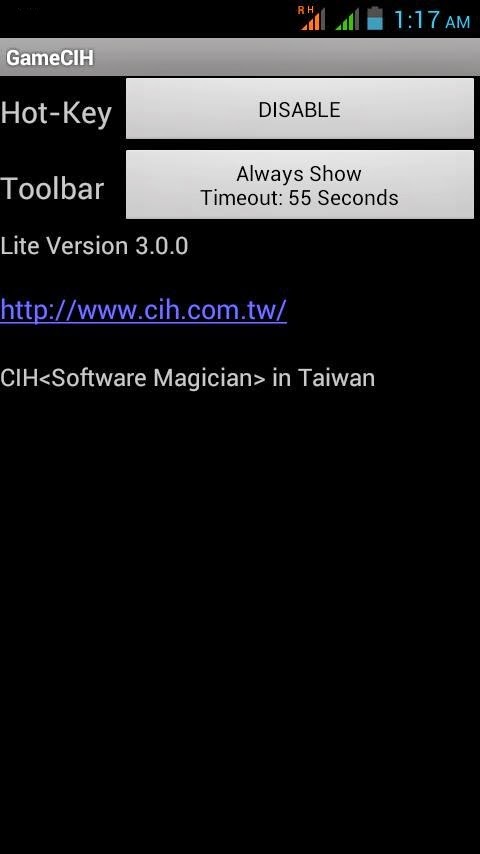
Step 1. First of all after rooting your android device open the GameCIH App. It will ask you for superuser access, grant it.(This will only come if you have properly rooted your android device. Now on the home screen of this app, you will see Hot-Key option, select any of them which you feel more convenient while using in your android.
How To Hack Any Game On Your Android Smartphone
Step 2. Now open the game that you want to hack into your android device. Now pause the game and access the hotkeys displaying there, select any value that you want to edit in your game. Like any of text value like keys of subway surfer game.

How To Hack Any Game On Your Android Smartphone
Step 3. Enter your desired value in the text field box appeared there and click on done. Now you will see default value will get replaced with your value. Similarly, you can alter any values in any of the game according to your wish.

How To Hack Any Game On Your Android Smartphone
That's it game hacking is done, Now you can access any resources using this hack.
So above is all about Hack Any Game On Android. With the help of this trick, you can alter any coins, lives, money, weapons power and lots more in any of your favorite android game and can enjoy the unlimited game resources according to your wish.
Using Game Guardian
Game Guardian Apk is one of the best apps which you can have on your Android smartphone. With the help of this app, you can easily get unlimited coins, gems and can perform all other hacks. However, Game Guardian Apk needs a rooted Android smartphone to work. Here's a simple guide that will help you.
Step 1. First of all, you need to download the latest version of Game Guardian on your Android smartphone from the given download link above or below.
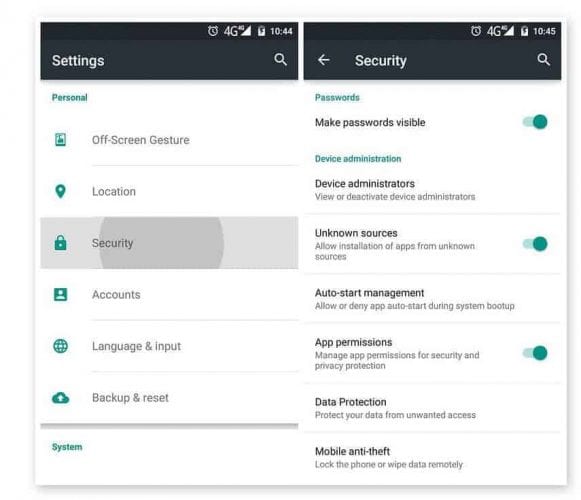
Step 2. After downloading on your smartphone, you need to enable the Unknown Source on your device. For that, you need to visit Settings > Security > Unknown Sources
Using Game Guardian
Step 3. Now install the app and then press the home button to minimize the app. Now open any game that you want to hack. You will see an overlay of Game Guardian App icon. Tap on it.
Step 4. Now you need to tap on the Search Button and set the value. If you don't know the values, then simply set it to auto.

Using Game Guardian
Step 5. You need to search for the value which you want to hack like money, gem, health, score etc. You can change all those values. Suppose, if you need to decrease the number of values, you need to scan again for the new value.

Using Game Guardian
Step 6. Finally, you need to select all the values and then change it to infinite numbers like '9999999' or whatever you want.

Using Game Guardian
That's it, you are done! This is how you can use Game Guardian Apk to hack games on your Android smartphone.
With this, you can play a game at any levels without any shortage of any resource that can interrupt your gameplay. Hope you like this coolest android game hack. Don't forget to share it with others too.
Related articles
Linux Command Line Hackery Series - Part 5

Welcome back to the Linux Command Line Hackery series, this is Part-V of the series. Today we are going to learn how to monitor and control processes on our Linux box, so wrap your sleeves up and let's get started.
Command: ps
Syntax: ps [options]
Description: ps displays information about the currently running processes. Some of the common flags of ps are described briefly below
Flags:
-A or -e -> select all processes
-a -> select all processes except both session leaders and processes not associated with a terminal.
T -> select all processes associated with current terminal
-u <username or id> -> select all processes of a given user or userlist
Open up a terminal and type ps:
ps
what you'll see is a list of processes currently running in your terminal. One important thing to notice in the output is what's called as PID which stands for process ID. It is the number that uniquely identifies a process. Just keep that PID concept in mind we'll use it soon.
OK I know that's not really what you want to see rather you want to see all the processes that are currently running on your box. Don't worry we have flags to rescue, in order to see all the processes you can use the -e flag like this:
ps -e
Boom! you get a long list of processes currently running on your machine (don't stare at me like that, you asked and I gave you that). If you want to see processes of a particular user you can type the following command in your terminal:
ps -u bob
here "bob" is a username. This command will list all processes of the user with effective user name of bob.
You can do a full-format listing of the processes using the -f flag like this:
ps -fu bob
But the output of the ps command is a snapshot not really a live preview of what is going on in your box. I know your next question is going to be something like this, Isn't there a command in Linux that gives me a live updating information of the processes? Yes, there is a command called top that we'll learn about next.
Command: top
Syntax: top [options]
Description: top gives a dynamic real-time view of a running system. That is, it gives the up-to-date information about all the processes running on your Linux box (sounds fun!). Besides giving information about current processes and threads top also provides a brief system summary.
To start top just type this command:
top
and you'll get a nice and cute looking ugly display :). Well what the heck is going on here you might ask, right? What you get is information about what is going on with your computer. To see what more can you do with top just type <h> within the program window and you'll be given list of options that you can play with.
OK looking at what processes are going on in your box is cool but what if you want to terminate (or close) a process, is there a command line utility for that? Yes, there is and that's what we are going to look at next.
Command: kill
Syntax: kill [options] <pid> [...]
Description: kill is used to send a signal to process which by default is a TERM signal meaning kill by default sends a signal of termination to process (Cruel guy). To list the available signals we can use the -l or -L flag of the kill command.
To simply terminate a process we provide kill command a PID (process ID) and it will send the TERM signal to the process. So to kill a process first we'll list the running processes and then we'll keep the PID of the process in mind that we want to terminate. After that we'll issue the kill command with the PID that we just found.
ps -ax
kill 1153
the above command will send a TERM signal to the process whose PID is 1153, as simple as that.
We can also use our already learned skills to refine the output of ps command. Say we have a xterm terminal running on our box and we want to terminate it. By using ps command all alone we'll get a long listing of all processes running on our box. But we can limit the output of ps command to just those processes that we're interested in by piping ps command with the grep command like this:
ps -ax | grep xterm
wow! that's amazing, we're able to pull out only those results from the ps command that contained xterm in them. Isn't that a cool trick? But what is that vertical bar ( | ) doing in the middle, you may be thinking, right? Remember we learned about the input and output re-directors previously, the vertical bar (pipe in geeky terms) is another re-director whose task is to redirect the output of one command as input to another command. Here the pipe redirects the output of ps -ax command as input to grep command and of-course from the previous article you know that grep is used to search for a PATTERN in the given input. That means the above command searches for the xterm word in the output of ps -ax command and then displays just those lines of ps -ax command which contain xterm. Now get that PID and kill that process.
That's it for today, try these commands up on your own box and remember practice is gonna make you master the Linux command line. :)
Related posts
TERMINOLOGIES OF ETHICAL HACKING
What is the terminologies in ethical hacking?
Here are a few key terms that you will hear in discussion about hackers and what they do:
1-Backdoor-A secret pathway a hacker uses to gain entry to a computer system.
2-Adware-It is the softw-are designed to force pre-chosen ads to display on your system.
3-Attack-That action performs by a attacker on a system to gain unauthorized access.
4-Buffer Overflow-It is the process of attack where the hacker delivers malicious commands to a system by overrunning an application buffer.
5-Denial-of-Service attack (DOS)-A attack designed to cripple the victim's system by preventing it from handling its normal traffic,usally by flooding it with false traffic.
6-Email Warm-A virus-laden script or mini-program sent to an unsuspecting victim through a normal-looking email message.
7-Bruteforce Attack-It is an automated and simplest kind of method to gain access to a system or website. It tries different combination of usernames and passwords,again & again until it gets in from bruteforce dictionary.
8-Root Access-The highest level of access to a computer system,which can give them complete control over the system.
9-Root Kit-A set of tools used by an intruder to expand and disguise his control of the system.It is the stealthy type of software used for gain access to a computer system.
10-Session Hijacking- When a hacker is able to insert malicious data packets right into an actual data transmission over the internet connection.
11-Phreaker-Phreakers are considered the original computer hackers who break into the telephone network illegally, typically to make free longdistance phone calls or to tap lines.
12-Trojan Horse-It is a malicious program that tricks the computer user into opening it.There designed with an intention to destroy files,alter information,steal password or other information.
13-Virus-It is piece of code or malicious program which is capable of copying itself has a detrimental effect such as corrupting the system od destroying data. Antivirus is used to protect the system from viruses.
14-Worms-It is a self reflicating virus that does not alter files but resides in the active memory and duplicate itself.
15-Vulnerability-It is a weakness which allows a hacker to compromise the security of a computer or network system to gain unauthorized access.
16-Threat-A threat is a possible danger that can exploit an existing bug or vulnerability to comprise the security of a computer or network system. Threat is of two types-physical & non physical.
17-Cross-site Scripting-(XSS) It is a type of computer security vulnerability found in web application.It enables attacker to inject client side script into web pages viwed by other users.
18-Botnet-It is also known as Zombie Army is a group of computers controlled without their owner's knowledge.It is used to send spam or make denial of service attacks.
19-Bot- A bot is a program that automates an action so that it can be done repeatedly at a much higher rate for a period than a human operator could do it.Example-Sending HTTP, FTP oe Telnet at a higer rate or calling script to creat objects at a higher rate.
20-Firewall-It is a designed to keep unwanted intruder outside a computer system or network for safe communication b/w system and users on the inside of the firewall.
21-Spam-A spam is unsolicited email or junk email sent to a large numbers of receipients without their consent.
22-Zombie Drone-It is defined as a hi-jacked computer that is being used anonymously as a soldier or drone for malicious activity.ExDistributing Unwanted Spam Emails.
23-Logic Bomb-It is a type of virus upload in to a system that triggers a malicious action when certain conditions are met.The most common version is Time Bomb.
24-Shrink Wrap code-The process of attack for exploiting the holes in unpatched or poorly configured software.
25-Malware-It is an umbrella term used to refer a variety of intrusive software, including computer viruses,worms,Trojan Horses,Ransomeware,spyware,adware, scareware and other malicious program.
Follow me on instagram-anoymous_adi
Wednesday, May 20, 2020
Leo's Noob
I would like to send a salve to my friend noob at Rivendel in Brazilian company hahaha
Tuesday, May 19, 2020
Difference Between Hacker, Programmer, And Developer
There are numerous sprite debates and discussions on the differences between hackers, developers, and programmers. With most descriptions, however, there is usually a slight flaw in at least one or two serious ways. These terms are all traditionally misused and misunderstood, with many of us frequently mixing them up as an all-encompassing definition of anyone working on the Software realm.

However, if you are looking to clarify your project goals and business needs adequately, it is essential that you understand that all these terms do not all represent the same thing (although a person with the ability to program a computer can use different skills to accomplish various outcomes).
What's more, it is also quite important for you to differentiate between these three terms if you are working with software development groups and the fact that they cannot be interchanged. This excerpt seeks to break it all down for you mainly-the vital difference between hackers, developers, and programmers, their actual tasks, as well as their relationship.
The Hacker
A hacker is a computer expert who uses his knowledge of computer networking, programming, cryptography, and databases to overcome a problem in the system. Hackers are more concerned with availing the concept as opposed to minding about the long-term quality. And although a hacker can conceptualize about how will ultimately be created while frantically writing code, the role is primarily about speed.
A hacker, as well as hacking,' are most useful in dealing with emergency circumstances or when prototyping an item. Hackers and the profession of hacking, in general, is not concerned with the ultimate effect of the code.
Hackers make things. They typically alter the things programmers create and transform them to function differently as well as also writing codes. While "hacker" can refer to any skilled technical person, the term has become associated with computer security, someone who, with their technical knowledge, uses bugs or exploits to break into computer systems.
The Programmer
A programmer is an individual equipped with the expertise to write codes. Programmers usually master in a single or multiple programming languages and boast vast knowledge on related areas also. Their roles are relatively procedural and mandate for total concentration not to mention refined skills.
A programmer is solely focused both in writing codes as well as getting features appropriately performed so that these features are accessible for integration and later use. Programming is merely the process of swinging the hammer and adequately creating the software.
Usually, it is easy to identify that an individual is in programming mode since they often have a concentrated gaze and are deep in the zone.' Programmers are normally internalizing the system they are operating as well as editing and writing pieces of something that can only best be described as a long algebra problem.'
The Developer
Developers are typically creators. However, not anyone that is an expert at writing codes can be a developer. Developers are experts at identifying ways around various problems as well as plugging together components to fulfill some requirements. These professionals solve problems or create things by adhering to a specific set of principles (design and implementation).
This set of principles includes attributes such as maintainability, performance, robustness, security, and scale among others. They solve problems in a systematic manner. Ideally, this is what distinguishes programmers, developers, and hackers.
In A Nutshell:
In all simplicity, these three professionals solve various problems using code. A programmer is an encompassing term that means a problem solver, a developer is a trained programmer (formal) who besides resolving issues achieves it in an organized and methodical manner likely instilled in the course of their formal education, and a hacker is a tinkerer/creator.
Despite their differences in individual meaning and professional capacities, these terms, however, can interrelate with each other quite effectively. In fact, it is possible for you to combine the skills to your benefit. In reality, all developers and hackers are programmers. However, despite their expertise, not many developers and programmers are creative enough to warrant an identity as hackers.
Finally, although hackers and programmers are quite impressive, they are however not experienced or educated enough to warrant consideration as developers. The similarity, however, is that all work to create code, each in their specified manner.
Ideally, anyone would work to be all the above-as creative as a hacker, though, somewhat better experienced and formally trained to design software as opposed to only hacking.
Nonetheless, even if you lack the creativity, experience, or education, or either to necessarily create a broad application, it is still worth noting that you are still ideally a programmer. And in case you did not know, solving a problem through code is by itself, a superpower!
@£√£RYTHING NT
More articles
MyPublicInbox: Algunos Perfiles Públicos Del Mundo Del Empredimiento Y La Cultura #MyPublicInbox @Mypublicinbox1
El proyecto de MyPublicInbox acaba de cumplir siete mese de vida la semana pasada, pero no para de crecer a buen ritmo, lo que nos llena de energía para seguir trabajando en hacer cada día una mejor plataforma. En el post de hoy solo os quiero traer una pequeña actualización del mismo y dejaros algunos de los perfiles públicos que se han sumado al proyecto desde el mundo del emprendimiento y la cultura.
 |
| Figura 1: MyPublicInbox: Algunos Perfiles Públicos del mundo del Empredimiento y la Cultura |
Son solo algunos de los que se van sumando, pero si estás pensando en hacer algún proyecto en tecnología, o quieres contactar con ellos, lo puedes hacer vía su cuenta de MyPublicInbox de la forma más respetuosa.
Reconozco que con Fernando Romay tengo cierto cariño especial porque me crié con el póster del Real Madrid de Baloncesto que ganó la Recopa de Europa de Baloncesto de 1984. No recuerdo cuando ganaron la Copa de Europa de Barcelona en el año 1979-1980, pero sí viví la final de 1984 y la medalla de plata en los Juegos Olímpicos de Los Ángeles 1984, y aún me acuerdo de Romay, Corbalán, Fernando Martín, Del Corral, Sorozabal y Corvalán. Luego vendrían otros, pero aquellos jugadores fueron los de mi niñez.
 |
| Figura 2: Contactar con Fernando Romay en MyPublicInbox |
Después, Fernando e Iturriaga comenzarían carrera en la televisión y me hice más fan. Ahora tener a Fernando Romay en MyPublicInbox es una maravilla. Cuando lo vea en persona me debe un abrazo que me ha prometido.
El grupo Taburete es uno de los que está más enganchado con la juventud hoy en día. Y cuando fui a ver el concierto de Arnau Griso tuve la suerte de conocer a Willy. Hablamos de cine - es un especialista en cine independiente -, de música, y de pasarlo bien. Yo le conté lo que estábamos haciendo con MyPublicInbox y ahora Willy tiene su buzón por aquí.
 |
| Figura 3: Contactar con Willy Barcenas en MyPublicInbox |
Es la directora del diario Observatorio Blockchain y Blockchain Media. Consultora de Comunicación. Organizadora del primer meetup sobre Blockchain y Periodismo y escribe en Post2020. Fue Presidenta de Telemadrid, docente en la Universidad Carlos III de Madrid, Dircom de la Cámara de Comercio de Madrid y organizadora de diferentes eventos relacionados con Blockchain además de dar muchas conferencias sobre la aplicación de Blockchain en las industrias culturales y creativas. Ahora la tienes accesible en su buzón en MyPublicInbox.
 |
| Figura 4: Contactar con Covadonga Fernández |
CEO de Territorio Blockchain, Presidente de la Asociación MIT, Ambassador en España del proyecto Beam y global Pioneer de Gxchain, así como COO de WOONKLY. También es productor, locutor y director de medios; como Telemotril, Motrildigital.com y el creador y director del podcast "Territorio Bitcoin" en IVOOX. Actualmente he lanzado una web de medios especializada en tecnología https://territorioblockchain.com
 |
| Figura 5: Contactar con José Fernando Molina Pinos en MyPublicInbox |
Especializado en trajes de ceremonia a medida, sus creaciones han desfilado por alfombras rojas y sus prendas únicas y artesanales han protagonizado numerosas portadas de las publicaciones más conocidas. Desde 2005 su nombre también está unido a la creación de vestuarios para teatro, cine, danza y ópera, debido a su otra faceta: la de figurinista, destacando su trabajo para la Compañía Nacional de Teatro Clásico. Colabora en El Comanche, programa de Onda Cero que dirige Julia Otero.
 |
| Figura 6: Contactar con Lorenzo Caprile en MyPublicInbox |
También es jurado del programa de TVE, Maestros de la Costura. Ha recibido numerosos premios por la excelencia de su trabajo como modista y figurinista. Ha sido galardonado con la Medalla de Oro al Mérito en las Bellas Artes. Ahora puedes contactar con el en su buzón público en MyPublicInbox.
Probablemente conozcas La Más Mona, una de las startups más prometedoras en España que se dedica al alquiler de vestidos y accesorios de fiesta (tocados, bolsos, joyas, guantes, cinturones). En Pinterest puedes ver muchos de los conjuntos que lleva la gente para ser "La Más Mona". Tienes a Polo Villaamil, fundador y CEO de La Más Mona en su buzón de MyPublicInbox.
 |
| Figura 7: Contactar con Polo Villaamil en MyPublicInbox |
Andrés Ortiz Moyano
Periodista, escritor y consultor de comunicación, dirige la agencia AOM, especializada en comunicación y marketing digital, y la consultora digital y tecnológica E-LAND. Especializado en periodismo de investigación, estudio de la propaganda, nuevas tecnologías y terrorismo yihadista.
 |
| Figura 8: #Yihad: Cómo el estado islámico ha conquistado inernet y los medios de comunicación. |
Colabora habitualmente en medios de comunicación españoles e internacionales y es autor de los libros #YIHAD. Cómo el Estado Islámico ha conquistado internet y los medios de comunicación, Los falsos profetas. Claves de la propaganda yihadista , el ensayo sobre ciencia ficción y videojuegos Yo, Shepard. El Universo de Mass Effect y de la novela de fantasía Adalides del Este: Creación. Ahora puedes contactar con Andrés Ortiz Moyano en su buzón en MyPublicInbox.
 |
| Figura 9: Contactar con Andrés Ortiz Moyano |
Teresa Gonzalo
Es una investigadora y científica española especializada en cáncer y SIDA, coautora de dos patentes mundiales, cofundadora de Ambiox Biotech y reconocida por su labor solidaria. Es experta en terapias selectivas que utilizan nanopartículas, para curar enfermedades hepáticas y tumores así como para prevenir el VIH. Desde hace ya unos años, desarrolla su carrera en Dallas (Estados Unidos).
 |
| Figura 10: Contactar con Teresa Gonzalo |
Ha recibido el primer galardón de la Fundación Genoma España y fue nombrada Mujer del Año por la revista Scientific Entrepreneurial Woman Today. Este es su buzón público. Puedes contactar con ella para consultarle cualquier tema relacionado con el emprendimiento, biotecnología o inversión.
Es un artista conceptual e ilustrador titulado en Ilustración y Dibujo Publicitario por la Escuela de Artes de Zaragoza. En la actualidad está vinculado principalmente al mundo del entretenimiento y editorial. Con mas de veinticinco años de experiencia en el sector artístico, en la actualidad se dedica de forma específica, al mundo de la ilustración a través del uso de herramientas digitales y especializándse en Arte Conceptual para el sector del entretenimiento.Trabaja como freelance vinculado principalmente al mundo del videojuego, editorial, postproducción y formación de nuevos artistas. Puedes contactar con él en su buzón en MyPublicInbox.
 |
| Figura 11: Contactar con José Antonio Germán |
Es Criptoeconomista y desde el año 2007 su actividad ha ido centrándose, cada vez más a la formación. Profesionalmente ha sido subdirector de agencia de bolsa alemana, Hanseatic Brokerhouse, en la sucursal para España y LATAM. Actualmente es CEO y cofundador de CRIPTORO, empresa Fintech y director de EFID, la Escuela Financiera e Innovación Digital de Criptoro. Es autor de dos libros: "Diario de un especulador" y de "Criptopedia ¡Hola Bitcoin!".
 |
| Figura 12: Contactar con Jesús V. Sánchez-Bermejo |
Desde la última actualización que os hice del proyecto, se han dado de alta cientos de usuarios en la plataforma, pero os he seleccionado solo diez perfiles públicos para hoy. Como sabéis, tenemos una sección para vez algunos de los Perfiles Públicos destacados por algunas categorías, y os he dejado muchos otros perfiles en las referencias que os dejo aquí de MyPublicInbox. Recuerda, que en la web tienes información sobre cómo ser un perfil público en MyPublicInbox.
Más Referencias:- Cómo contactar con Kevin Mitnick, el hacker más famoso de la historia
- MyPublicInbox: Campaña contra el Coronavirus
- MyPublicInbox: Muchos más perfiles públicos
- MyPublicInbox: Campaña contra el Coronavirus
- MyPublicInbox: Muchos más perfiles públicos
- MyPublicInbox: La plataforma que da un uso inteligente a tu 'email'
- Cómo establecer relaciones profesionales y obtener respuesta gracias a MyPublicInbox
- ¡El e-mail ha muerto! ¡Larga vida al e-mail!
- Cómo establecer relaciones profesionales y obtener respuesta gracias a MyPublicInbox
- ¡El e-mail ha muerto! ¡Larga vida al e-mail!
- MyPublicInbox: Un proyecto para acercarte a perfiles públicos relevantes.
- MyPublicInbox: Milestone ZERO
- MyPublicInbox: Servicio de Originales Digitales
- MyPublicInbox: La española que puede competir con Linkedin
- MyPublicInbox: Haz que te paguen por leer tu correo
- MyPublicInbox: Cuando 24 horas al día no son suficientes
- [Youtube]: MyPublicInbox por Chema Alonso
- MyPublicInbox: Milestone ZERO
- MyPublicInbox: Servicio de Originales Digitales
- MyPublicInbox: La española que puede competir con Linkedin
- MyPublicInbox: Haz que te paguen por leer tu correo
- MyPublicInbox: Cuando 24 horas al día no son suficientes
- [Youtube]: MyPublicInbox por Chema Alonso


Read more
Subscribe to:
Comments (Atom)